3D Open World Explorer
About 3D Open World Explorer
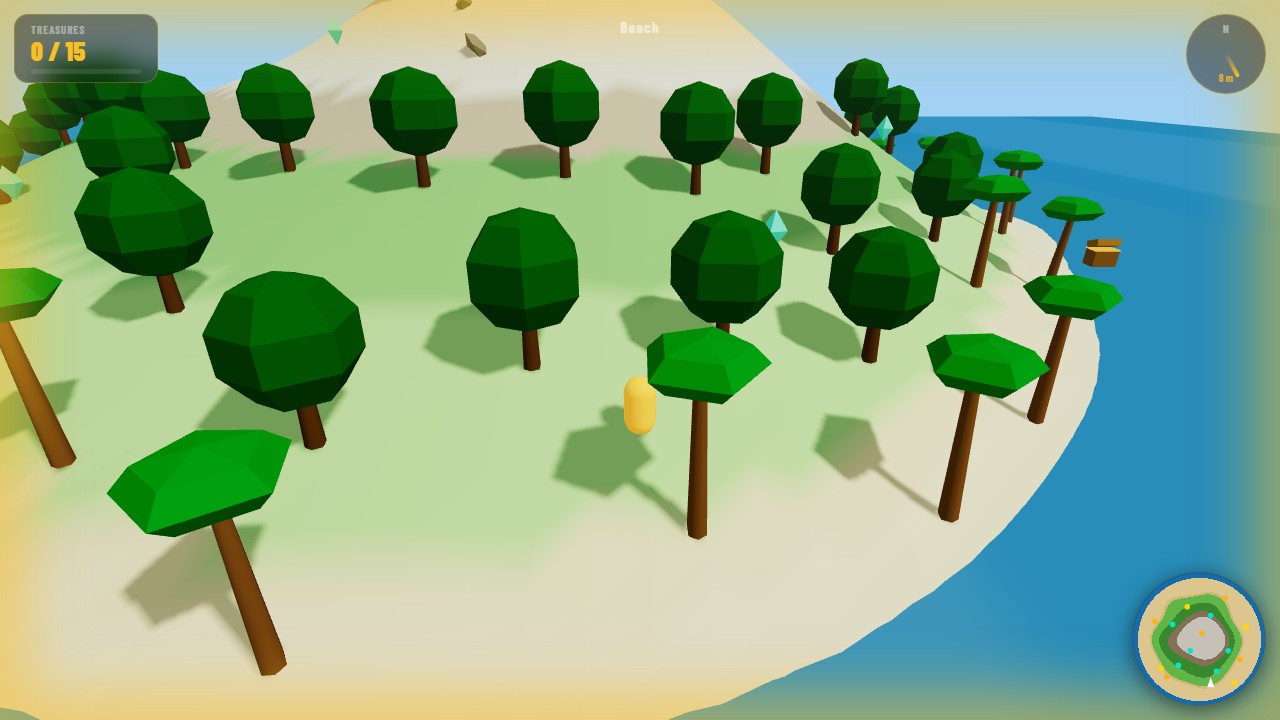
3D Open World Explorer drops you into a handcrafted low-poly landscape with no timer and no enemies — just a vast world waiting to be discovered. Starting in the warm Sunlit Meadow, you can wander in any direction: north toward the snow-capped Summit Peak, west into the shadowy Whispering Pines, northeast to the craggy Rocky Heights, or south toward the glittering Crystal Lagoon and mysterious Ancient Ruins. Every corner of the map holds secrets.
Thirty collectibles are scattered across the world in three rarity tiers. Common Wanderer's Gems glow gold in the open meadows and forests. Rarer Forest Crystals hide in the shade of trees and boulders. And five Legendary Stars — marked by an orange point-light glow you can spot from a distance — are tucked away at the most dramatic landmarks: inside a ruined archway, at the summit overlooking the whole world, and deep in the lagoon's centre. A minimap in the corner shows uncollected items as faint dots to help orient your search.
Progress saves automatically every time you collect a treasure or discover a new zone. Close the tab and come back later — your explorer is exactly where you left them, and every gem you found stays found. The world is always there to explore at your own pace.
How to Play 3D Open World Explorer
- Press any movement key or click Start to begin. You spawn in the Sunlit Meadow at the centre of the world.
- Use WASD (or arrow keys) to move. Movement is always relative to the camera direction. Hold SHIFT to run — footsteps change cadence and your speed nearly doubles.
- Press Q or E to rotate the camera left or right around your character. Positioning the camera well is key to spotting hidden collectibles.
- Press SPACE to jump — useful for cresting ridges, hopping across rocks, and reaching elevated spots. You land back on the terrain automatically.
- Walk close to any collectible to pick it up. Wanderer's Gems (💎) have the widest pickup radius; Legendary Stars (⭐) are harder to reach but reward the most. Watch the top-left counters.
- Entering a new zone triggers a discovery toast at the bottom of the screen. All six zones and all collected items are saved to your browser automatically — no account needed.
Frequently Asked Questions
How do I find the Legendary Stars?
There are five: one inside the stone archway at Ancient Ruins, one at the very top of Summit Peak (head north until the terrain is snow-white), one in the centre of Crystal Lagoon (wade in from the shore — you won't sink), one near the apex of Rocky Heights, and one on a secret hilltop just north of Sunlit Meadow. Each glows with an orange point light you can see from a distance.
Does my progress save automatically?
Yes — every collectible you pick up and every zone you discover is saved immediately to your browser's localStorage. Close the tab, come back later, and your explorer will be at the same position with all their finds intact. To start fresh, clear your browser's site data.
What is at the top of Summit Peak?
A Legendary Star sits at the very summit, surrounded by snow-white terrain. The climb from Sunlit Meadow takes about 90 seconds of running. The view from the top lets you spot glowing collectibles across the whole world below.
Why can I walk through the water?
The Crystal Lagoon's water plane is decorative — it marks the deepest part of the terrain depression. The actual terrain still exists beneath it, just lower than the water surface. Walk straight in; the terrain snaps your feet to the underwater ground.
Can I run faster than normal?
Yes — hold SHIFT while moving to run at nearly double walking speed (11 vs 6 units per second). Footsteps also speed up. Useful for crossing the meadow quickly or sprinting toward a glow you spotted on the minimap.
Can I play on mobile?
This game requires keyboard input — WASD to move, Q and E to rotate the camera, Shift to run, and Space to jump. Without a keyboard, exploration is not possible. Best played on a desktop, laptop, or tablet with a Bluetooth keyboard.